
2 min read
Fake Permissions
Restrict moderators to only use serenity for moderation.
Replace [prefix] with your server's prefix.
Setup and Information
What are Fake Permissions?
- Fake permissions are a way to help keep your server safe. With fake permissions, you can allow roles to use certain commands that require a permission without actually giving the role a permission. This will prevent any malicious harm to your server.
Why Should I Use Fake Permissions?
- If your guild roles don't have any dangerous permissions, a bot or untrustworthy/compromised staff member won't be able to do anything without using serenity.
Parameters
| Parameters | Description |
|---|---|
| Role | Mention the role or paste role ID |
| Permission | Permission to grant or remove |
Fake Permissions Add and Remove
Please Note: You must have administrator permissions to run the configuration commands below.
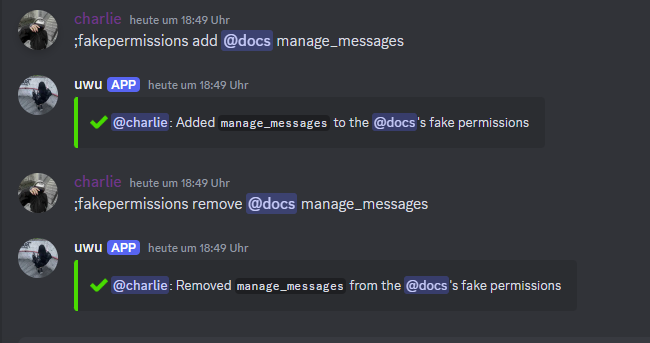
To grant roles fake permissions, use the following command:
// Syntax
[prefix]fakeperms add [role] [permission]
// Example
;fakeperms add @Mod manage_messages
To revoke fake permissions, use the following command:
// Syntax
[prefix]fakeperms remove [role] [permission]
// Example
;fakeperms remove @Mod manage_messages
To view which fake permissions a role has, use the following command:
// Syntax
[prefix]fakeperms list [role]
// Example
;fakeperms list @Mod
List of Fake Permissions
Below is the list of all the permissions that can be granted to a specific role:
create_instant_invitekick_membersban_membersadministratormanage_channelsmanage_guildadd_reactionsview_audit_logpriority_speakerstreamread_messagessend_messagessend_tts_messagesmanage_messagesembed_linksattach_filesread_message_historymention_everyoneexternal_emojisview_guild_insightsconnectspeakmute_membersdeafen_membersmove_memberschange_nicknamemanage_nicknamesmanage_rolesmanage_webhooksmanage_expressionsuse_application_commandsrequest_to_speakmanage_eventsmanage_threadscreate_public_threadscreate_private_threadscreate_expressionsmoderate_members
Last edited