
Auto Reactions & Responders
React to or reply to messages containing a trigger word, automatically.
Replace [prefix] with your server's prefix.
Both systems watch for a trigger word in a message. One reacts to it, the other replies to it. Both need Manage Server.
Auto Reactions
// Syntax
[prefix]autoreact add [trigger], [emojis]

// Example
;autoreact add skull, 💀
;autoreact add cake, 🎂 🎉
The comma matters - everything before it is the trigger, everything after it is the emojis, separated by spaces. Custom server emojis work as well as unicode ones.
| Command | What it does |
|---|---|
[prefix]autoreact list | Every trigger and its emojis |
[prefix]autoreact remove [trigger] | Delete one |
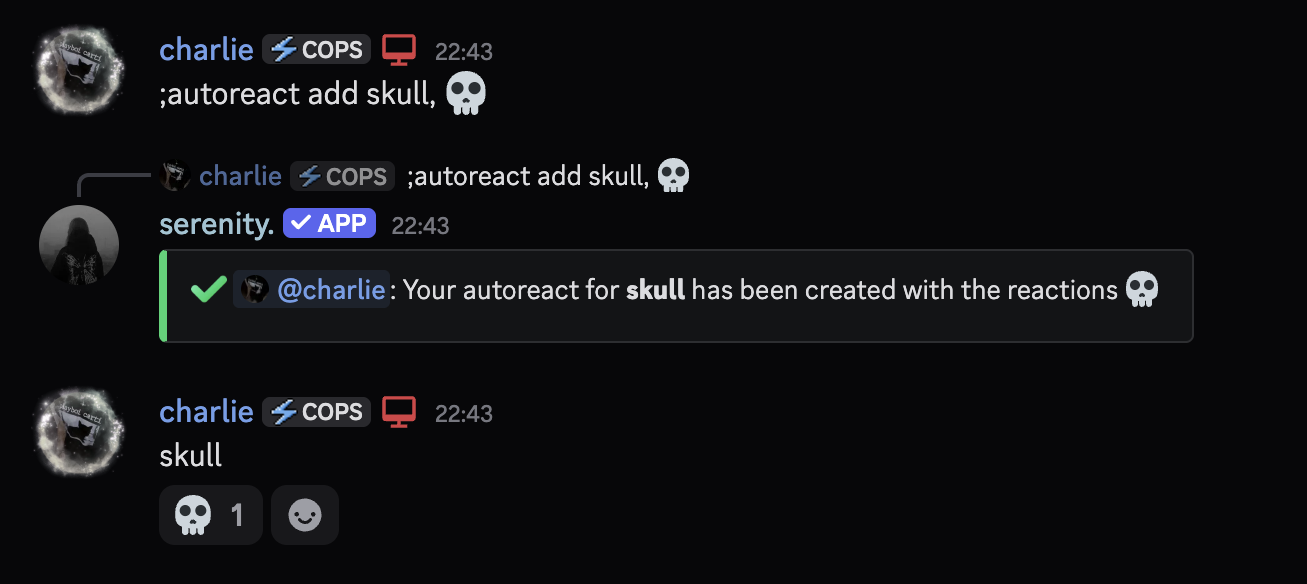
Adding the same trigger again overwrites its emojis rather than creating a second rule - that's how you edit one.
Auto Responders
// Syntax
[prefix]autoresponder add [trigger], [response]

// Example
;autoresponder add hello, hello world
;ar add ip, The server address is play.example.com
The response accepts full embed code, so an auto responder can post a proper embed instead of a line of text.
Writing Embed CodeHere, you can learn about how to script embeds for commands that support this feature.Flags
| Flag | Effect |
|---|---|
--not_strict | Match the trigger anywhere in a message, not as the whole message |
--reply | Reply to the triggering message instead of just posting |
;ar add ip, Our IP is play.example.com --not_strict --reply
By default a responder only fires when the message is the trigger. That's
usually what you want: --not_strict on a trigger like ip fires on "script",
"vip" and "recipient".
Limiting It to One Channel
// Syntax
[prefix]autoresponder channel [trigger] [channel]

// Example
;ar channel ip #support
;autoresponder list
;autoresponder remove ip
Auto responders answer everyone, including people quoting the trigger to
complain about it. Keep triggers specific, and prefer whole-message matching
over --not_strict.
Last edited